 12ozCode
WINDOWS_APPLICATION
Sonactl
Manage Windows playback and recording devices from one lightweight desktop utility. Switch default devices, adjust volume and mute state, restore preferred devices, and configure a global keyboard shortcut.
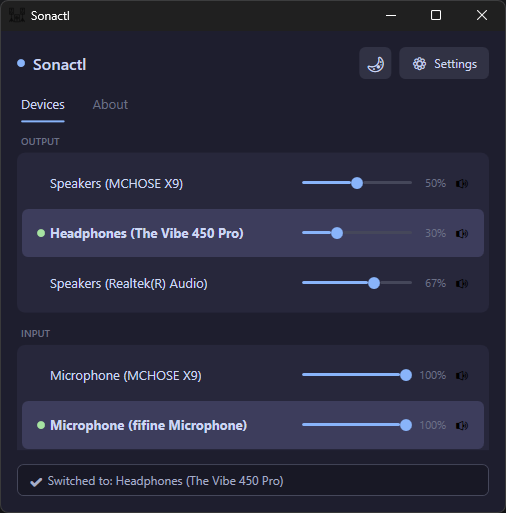
Quickly switch default Windows audio devices and control their volume and mute state.
- Switch default playback and recording devices.
- Control device volume and mute state.
- Restore preferred audio devices automatically.
- Cycle through output devices with a global keyboard shortcut.
- Choose which physical and virtual devices appear.
- Optionally launch with Windows.
- Stay accessible from the Windows system tray.
Optional anonymous diagnostics use a random local installation ID and report app usage, version, Windows/architecture, crashes, and performance without collecting personal or audio-device details.
Read full privacy details...
If anonymous diagnostics are enabled, Sonactl uses a random installation UUID stored locally in its settings as the Sentry user ID. It reports application starts and sessions, Sonactl version, Windows version, CPU architecture, sanitized crash and exception information, and sampled performance measurements. The installation UUID is not used as a metric dimension. Sonactl does not send Windows usernames, hostnames, email addresses, explicitly collected IP addresses, MAC addresses, hardware serial numbers, audio device names or identifiers, volume or mute settings, application settings, screenshots, keyboard input, or console output. Sentry may derive coarse geographic information from incoming telemetry according to project privacy settings; Sonactl performs no geolocation. You can disable diagnostics at any time in Settings, which ends the active telemetry session and stops further transmission.
07730404CB78E11CC6B232BD4E29F3798461123CE8F83C0A3F65CD4E9510A265